I think I love this commercial more and more
Heh, Skitch is fun and phpBB definitely sucks balls
I've meant to use Skitch for a while, and finally got around to using it today. It's pretty cool. For instance, you can do a search for "phpbb is a piece" and find some fun links:

Then, if you want, you can do some fun stuff to it. Like add some comments:

Tada!
Awesome. Takes about 2 seconds.
phpBB is a Piece of Feces and May Be the Bane of My Existance
I haven't been posting very much recently because I've sadly been working my tail off. I very much enjoy what I do, but there are just weeks (months ... years ...) where it's just a non-stop grind to get everything done. Recently, it's been working on launching a new VPS platform, but that was interrupted by a breakdown of our customer MySQL infrastructure.
Our setup is a bit different than most. Since we don't run a typical box-by-box web hosting architecture, we don't simply have a thousand boxes with each one running Apache and MySQL. Instead, we have a really robust pooled architecture for everything except MySQL, which just isn't something that's very poolable. For MySQL, we've got some big boxes with a bunch of memory and some fast disks that handle our MySQL load. But, slowly over time, performance had degraded.
When you'd hop onto a box and look at the transactions per second or number of queries, nothing looked terribly out of the ordinary. Yet the load would be huge, and performance would be pretty bad. Our team brought up some new boxes, shuffled customers between them to even the load out, moved our backup processing onto the hot spare replicated boxes (to reduce even more load on the disks) and things were better.
But they weren't better enough. (I know, awesome English, eh?)
We started just watching the processlist, looking for the culprit. And after about 5 minutes, it was obvious.
Motherfrakking phpBB spam.
phpBB is written in a really shitty way. Not the forum part, necessarily, which works when it's not being exploited. But the search part is awful. For every word in every post (unless you've got a smart list of words to ignore), it throws entries in some big tables so that when you search for "foobar", it can tell you every post that contains that work. That's a fine design for a small board with a tiny amount of traffic. But as your board grows, even legitimately, that table can become hundreds of thousands of rows long (or more!) and inserts and selects can become extremely slow.
It's ten times worse when the only thing putting content into is spammers who are just flooding it with huge wordlists multiple times per second. Now, all of a sudden, you've got this single board showing up in your processlist five times, with each entry running for 30, 40, 50 seconds. One of those boards can cause some extra load on a server.
When you've got ten or twenty, it can bring the server to a halt. Literally. I popped onto a server where the load was near 10. I turned off 40 phpBB boards getting spammed. The load dropped to less than 1 and stayed there.
After some quick thinking, we identified a bunch of boards that were getting spammed and turned them off. One of our engineers built a brilliant little monitoring script that can identify phpBB boards in the processlist and shut them off if they show up at a high enough frequency with those awful queries (you know then when you see them, believe me). All told, we've turned off maybe 12k boards in the past 2 weeks, and haven't heard a single complaint.
Why? Because these boards were setup by users who then forgot about them. And there they sat, for months or years, collecting spam, draining resources. Basic negligence on the part of users caused a huge server load, which then caused those same customers to call in and complain.
It feels like we've got this mostly under control, except for the user side. We need to figure out a way to get people to realize that the things they install on their site can be exploited and lead to security issues (on their site), performance issues (for everyone), and can suck up the resources they pay for.
But yeah, it sucks when you work about an 80 hour week because people forget about their phpBB install, and the folks who wrote phpBB decided that they'd build the most stupidly designed search setup of all time.
So, when on April 8th my Twitter looked like this:
-20080420-161832.jpg "php is feces")
now you know why.
Umm, Firefox ... maybe it's still cookie dough?
I installed Firefox 3 Beta 5. I've been running the Firefox 3 Beta for a while now, and it's been pretty solid. Well, it was less happy today. To paraphrase an episode of Buffy, it might not be fully-baked yet; it may still be cookie dough.
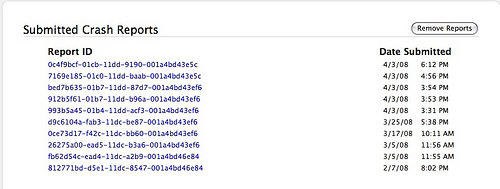
5 crashes in 3 hours. Maybe I should go back to Safari ...
Upgrading to WordPress 2.5
I figured I'd log what I did when I upgraded my blog to WordPress 2.5.
First, I disabled some plugins I figured I wouldn't necessarily need post-upgrade. The two I disabled were Kramer, which grabs Technorati links back to the blog (newly built into the WordPress dashboard) and SpotMilk, a customized dashboard (which I wasn't even sure would work).
Then I upgraded.
So far, so good.
Poking around the settings, I decided to turn on the global Gravatar usage, rather than using the Gravatar plugin. That's a great idea, except my theme doesn't come with Gravatar support, so I'll need to use the built in functions.
Then my MacBook crashed for the second time today (I think it's Twitterrific, but we'll see). Awesomely, MarsEdit earned its keep by having autosaved my work. So back to it.
After poking around, I got the built-in functionality to work, but since it returns an entire image tag, and not just the URL to the avatar image, it's actually less useful to me than the plugin is. I turned the plugin back on. Good enough.
Next, I noticed the Mowser plugin had a new version. Perfect chance to try the new built-in plugin updating. Clicked the link and that was pretty much it -- the plugin was up-to-date. Nifty. You can see the Mowser-fied version of my site here. Not perfect, but pretty good work from a one ... two person company.
Took this as the opportunity to clean up my plugins page. Gone are the aforementioned Kramer and SpotMilk, along with the Hello Dolly and WP-flv plugin I'd installed a while ago.
Now, I wanted to turn some of my hard-coded plugin links into widget usage, to make switching themes easier. I started adding widgets to my left sidebar, expecting that I'd need to go disable them in the code. Nope! Nice, it must use a different bit of sidebar code when you use widgets. Very cool. This allows me to dump a couple more plugins (MyNetflix and a Last.fm one).
Also, turn off WP-Cache when you're testing, or you'll be annoyed out of your mind.
One missing widget: I was previously using the Google Shared Items widget, but now I'll just use the RSS feed for it. Let's see how that looks ... ugly. But, good enough for now. Maybe there's a WordPress widget for it. Wow, I'm digging the widgets. They make my life a whole lot easier. I should have tried this a long time ago. Even added a little About Me text widget.
Turning WP-Cache back on.
Finally, testing to see if MarsEdit can still post ... huzzah! Success. And with that, I'm done.
"As God as my witness, I thought turkeys could fly"
The other day at trivia (where we came in 4th out of 25 teams), there was a question about WKRP in Cincinnati, which I remembered, but no one else did. I mentioned to my teammates what may be the funniest sequence from any episode I can remember. Then I went on hulu.com, and lo! there it was.
I figured this was a good chance to try out the Hulu embedded clip thing. So, here's what I think is a damn funny 3 minutes from WKRP in Cincinnati.
(If this doesn't work, I'll fix it. Just trying to do the Hulu embed through MarsEdit.)
Going Hollywood Isn't All That Exciting
They're filming a movie near my office. It's affectionately referred to by IMDB as "Untitled Kevin James Comedy." I'm betting on it being a huge hit for a couple of reasons:
- It is written by *and* stars Kevin James
- It is also written by Salem the Cat
- It also stars Jayma Mays
- It is being filmed in Burlington, MA. At the Mall.
I smell a hit.
Anyway, they've apparently set up a production office right behind our building, and as I was walking over to talk to someone on the other side of the office, I saw some guy go zipping down a zip wire. I tried to get my camera in time, but missed any other awesome festivities. I did, however, take some awesome pictures of the amazing movie production set.
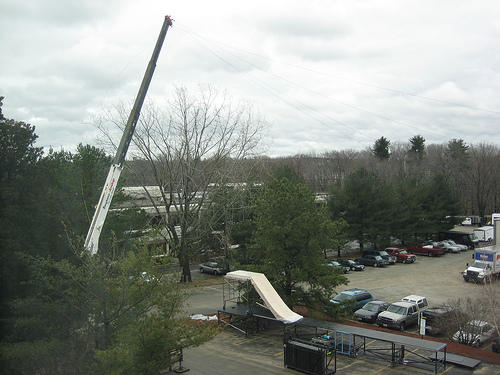
A ramp and a crane. No idea what they're for, but they're obviously super cool.

Some dudes and some metal stuff that looks like they're about to have a steel cage match.

What movie would be complete without a Segway scooter-thingy.
Sadly, I missed the casting call to be an extra, I think. But that's ok, I'm sure they'll grab me from the Apple Store and decide to make me a leading character, ideally with magic powers and a talking cat (who once tried to take over the world).
Pimp Me A Mac App
I wanna buy a new Mac app.
Things I'm considering:
- Coda -- The all-in-one web dev app is pretty cool, good looking, and I've used the demo to build a couple of pages. It's nice. It's also expensive. It'd be a no brainer at sub $50. I'm close to buying it when it's discounted at $79. It's hard to pull the trigger at $99.
- Twitterrific -- Almost a no brainer at $15, but all it does is remove ads and that just seems kinda wasteful to me.
- Warcraft 3 -- I just kind of want to play an old school RTS like Warcraft or Starcraft.
Sell me on an app or a game. Maybe I'll buy it.
Word To The Wise
Always, Always, Always start your MySQL update query with the limit and the where clause, even if you've done the query a thousand times before.
The one time you screw it up, it will be on a Friday evening, when you're just trying to do one last thing for the day before you head home, and when most of the office has gone home.
Oh, and it'll be a database of 30 million DNS records and you'll manage to wipe them all out.
Yep, that's why I did last Friday. I was stupid and working too fast, and managed to hit the ' and Enter in quick succession, as they sit next to eat other on the keyboard. Caught my mistake when it wiped out "only" 13k records on the master database, but the query had already replicated out and managed to take out the slaves.
My saving grace is that we've got a couple of great folks in our sysadmin group, and they helped me get things back from a backup pretty quickly.
But yeah, that was scary. And not fun. Now I've been on both sides. I've helped people recover from a disaster ... and I've caused a huge disaster. Go me.
Those Who Can't, Teach
Late on Wednesday, I was asked in passing if I would mind basically being the guinea pig for a new training technique we're trying at work. We're growing pretty rapidly, so we're constantly bringing in new folks, folks who don't necessarily come from a web/hosting background (or sometimes even from an internet background). Putting aside for the moment whether or not that's a good thing, the goal is to do some formal "classes" where anyone can come attend an entry level class learning about DNS or mail or FTP or the web. These will be recorded and can be reviewed by anyone later on. We'll do some online tests and those who pass can then take the more advanced classes.
My topics were the aforementioned DNS and mail.
It's an interesting idea, if a bit idealistic. The idea has its own set of problems, but I was a) a bit excited that I got asked to do it, and b) optimistic that it would be at least a little more effective at getting folks up to speed than our current training, which sometimes assumes a base level of understanding and vocabulary.
So, I decided I would try to do it as well as I could, and not wing it like I usually do. I train a good bit as part of my job. Project Managers at my company end up training the rest of the company on how our apps work when we're rolling them out. Candidly, that should be the Product Managers role (and in some cases, they do fill it), but it's just never really been the prerogative of the company to have Product Managers tasked with that requirement.
Regardless, I train a good bit, and I just wing it, which often leads to moments of "well, when we fix this bug, this will work this way ... for now, let's just *pretend* it worked." I'm not terribly fond of my public speaking skills, which include a lot of "umm" and "ahh" and "well", but I'm pretty proud of my ability to react on the fly and adjust when things aren't going well. I also introduce a lot of humor (well, attempts at humor) in an attempt to distract from my sometimes below par speaking skills and to help at least keep people engaged in what can be dry material.
(Note: by humor, I should mean referencing 80s TV shows, talking about how swirling your mouse makes things run faster, making pubs. I don't mean that I'm actually funny. I'm not.)
This time needed to be different. It needed to be a legitimately strong presentation, with structure and flow. Of course, I didn't have a whole lot of time to prep (given that I still needed to do my real job). I spent Wednesday night on the treadmill at the gym going through the basic premise of what I would do. I spent Friday morning writing some bulleted notes which I turned into a NeoOffice presentation.
The training started at 2pm and, other than talking a bit too fast, I think I pretty much nailed them. Since I had notes and a basic flow, I didn't spend much time wondering where I was going. I tied the mail presentation into DNS. I dropped out of the presentation to take people through a Terminal-based SMTP and POP session. I even threw in the good old AOL "You've Got Mail" sound. 2 hours of training, minimal screw ups, questions answered on the fly. I think for the first time in a very long time, I was actually not embarrassed by my speaking abilities or my attempts of humor to cover them up.
I'm kinda lucky to have such a varied job (programming, managing, training, documenting, and more).
Wow, this was a complete ego-stroke post here. I'll write about something more interesting next.