After not sleeping for the better part of a week, last Saturday was the start, I hope, of a new era of not being quite as worried about the future.
I’m still worried.
But not quite as worried.
Time to breathe, before we get back to work.
Tech, music, sports, and other stuff.
After not sleeping for the better part of a week, last Saturday was the start, I hope, of a new era of not being quite as worried about the future.
I’m still worried.
But not quite as worried.
Time to breathe, before we get back to work.
Go. Do it. Go vote. Please.
During this whole pandemic thing1, I’ve not learned how to knit, or play the guitar, or even read more books. It’s mostly been work, family, and trying to stay sane.
The one thing I have focused on is trying to build more positive habits. For me, that’s mostly meant:
After the first six months of these habits, they really are habits. I can tell when I’ve eaten more than normal, or had a particularly unhealthy eating day. I feel it physically and emotionally when I don’t run.
The downside of these habits is that I started to develop some knee pain. I don’t stretch very often, and I’m not very flexible, so the downside of working from home (less daily movement aside from exercise) has lead to more aches and creakiness when running.
This lead to my third habit, and the one I never thought I’d develop: yoga.
I’ve spent the last month doing a 30 day beginner’s yoga program. I can do it in the morning while the kids eat breakfast, and, after 3 or 4 days of not being able to sort of take the yogi-ness of it seriously, it clicked for me. I don’t think I’m a devotee, but I do find that the 20-30 minutes a morning that I do the yoga starts my day off with a bit of calmness, and I think it’s following through to the rest of my day in increased patience and understanding. 2
At a minimum, I think my knee hurts less.
One month later, with Trump down in the polls and the political winds shifting, well, let’s just say the company has changed its tune. Dramatically. Not only has it banned Holocaust denial, it’s also banned anti-vax advertising and taken steps to pro actively manage the disinformation shitshow that will be the Trump campaign post election.
Witness this quote, from Zuckerberg himself, in his recent post framing why Facebook will now ban Holocaust denial from the platform: “Drawing the right lines between what is and isn’t acceptable speech isn’t straightforward, but with the current state of the world, I believe this is the right balance.”
Up until two weeks ago, Facebook was a place where QAnon conspiracy groups flourished, aided by its recommendation algorithms; where you could pay to promote anti-vaccine misinformation; where Holocaust denial was treated as a legitimate political opinion; and where conservative news outlets were known to get a pass on rule enforcement to avoid upsetting the right.
As of today, none of those things are true.
Facebook. More than willing to do the right thing, if the right thing is politically expedient.
I’ve just been collecting some of these links for the last few months. Almost everyone I’ve talked to feels better, healthier, and more sane if they’ve stopped, or limited their Facebook usage.
Facebook ignored or was slow to act on evidence that fake accounts on its platform have been undermining elections and political affairs around the world, according to an explosive memo sent by a recently fired Facebook employee and obtained by BuzzFeed News.
“I know that I have blood on my hands by now,” Zhang wrote.
Facebook Ignores Political Manipulation
Political manipulation is a known problem that has been happening on Facebook for years, and they’ve got no solution.
With all the negative press around, you might think they are not doing a good job at avoiding criticism, but consider the alternative that they’ve been able to weather all this because they’ve been able to deflect the criticism and avoid scrutiny and accountability. I know this all sounds pretty unhinged right now, but, stay with me. This is a company who hires conservative politicians to its highest ranks in multiple countries, while maintaining a veneer of political neutrality. The same company pretends its not the arbiter of truth while employing tens of thousands of people to do exactly that. Ask yourselves: What has changed at Facebook?
But you wouldn’t know that by the way they act. They are so worried about being regulated that they’ve now sold their soul (or what little is left) to the devil, so they can parry the “bias” issue rather than the real issue: that the good of Facebook is drastically outweighed by the negative created by the news feed, engagement, and Facebook groups.
Both reports were filed before the shooting took place, but identified the event and broader Kenosha Guard community as likely to incite violence. Last week, Facebook specifically identified militia groups as potentially inciting violence and removed a number of militia pages alongside hundreds of groups affiliated with QAnon. Still, it seems those warnings weren’t enough to trigger Facebook’s existing policies. It wasn’t until Wednesday morning, more than nine hours after the shooting took place, that Kenosha Guard was cited by Facebook as violating the Dangerous Individuals and Organizations policy and removed.
Reached for comment, Facebook said the company’s investigation had produced no direct links between the shooting and the Kenosha Guard accounts. “We’ve designated this shooting as a mass murder and have removed the shooter’s accounts from Facebook and Instagram,” a Facebook representative said. “At this time, we have not found evidence on Facebook that suggests the shooter followed the Kenosha Guard Page or that he was invited on the Event Page they organized. However, the Kenosha Guard Page and their Event Page violated our new policy addressing militia organizations and have been removed on that basis.”
Facebook chose not to act on militia complaints before Kenosha shooting
Tremendous system you’ve got there, Facebook. It definitely is much easier to know who to remove, if you wait until they kill people.
But Facebook says there’s a reason why right-wing figures are driving more engagement. It’s not that its algorithm favors conservatives — the company has long maintained that its platform is neutral. Instead, the right is better at connecting with people on a visceral level, the company says.
“Right-wing populism is always more engaging,” a Facebook executive said in a recent interview with POLITICO reporters, when pressed why the pages of conservatives drive such high interactions. The person said the content speaks to “an incredibly strong, primitive emotion” by touching on such topics as “nation, protection, the other, anger, fear.”
Why the right wing has a massive advantage on Facebook
It’s not a bug, it’s a feature.
Fifty-two percent of voters support shutting down social media platforms altogether for the week of the presidential election, according to a poll from GQR research shared exclusively with Axios.
Majority polled back a social-media blackout for election
Hey–the people seem to get it though! Let’s turn off the garbage heading into the election, and see if we can’t survive this hells cape!
The big picture: The News tab expansion is the latest effort by Facebook to pay news organizations for their work. The company has come a long way from its initial stance of refusing to pay publishers or hire human editors just two years ago.
Facebook accelerates News tab launch abroad
Also, a number of new countries are about to be horribly screwed.
Dozens of Facebook employees, in rare public criticism on Monday of their own company, protested executives’ decision not to do anything about inflammatory posts that President Trump had placed on the giant social media platform over the past week.
The employees, who said they refused to work in order to show their support for demonstrators across the country, added an automated message to their digital profiles and email responses saying that they were out of the office in a show of protest.
The protest group — conducting a virtual “walkout” of sorts since most Facebook employees are working from home because of the coronavirus pandemic — was one of a number of clusters of employees pressing Facebook executives to take a tougher stand on Mr. Trump’s posts.
Inside the company, staff members have circulated petitions and threatened to resign, and a number of employees wrote publicly about their unhappiness on Twitter and elsewhere. More than a dozen current and former employees have described the unrest as the most serious challenge to the leadership of Mark Zuckerberg, the chief executive, since the company was founded 15 years ago.
Don’t walk out. Quit. Nothing is going to fix Facebook until they face an existential threat that forces Zuckerberg to reckon with the impact of his decisions.
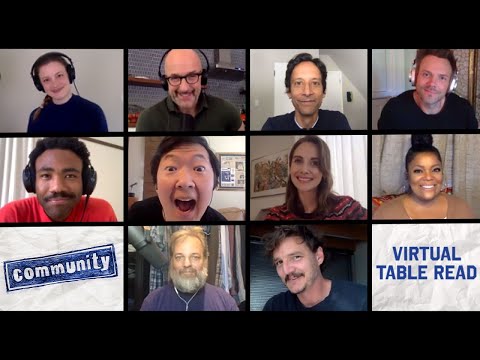
The cast of Community held a table read of one of their typically funny and heartfelt scripts. Community very much got caught up in NBC not knowing quite what to do with it, and the fact that we got six seasons (and a movie?) of it is remarkable.
This table read reminded me:
It’s a wonderful half hour. Follow it up with the 40 minute Q&A session that followed.
After Dan Harmon’s Harmontown podcast ended, I didn’t realize how much I’d missed his particular brand of heartfelt absurdity. Rick & Morty is hilarious and wonderful, but it doesn’t have the emotional core that Community did.
I guess it’s time to start rewatching again …
I do. I think I’m almost caught up on the music I was supposed to listen to in 2019. So, maybe by midway through 2020, I’ll say “oh, here’s some good music that’s more than a year old.”
I guess quarantining is good for something?
Hey. So, not much new in the world, eh?
I’m hoping to post a bit more, just to get some words out, given how much time I’m spending at home (and, as I expect, most of us are).
This post, however, is really a test to see if I can actually post from my iPad. I bought a new iPad (with the intent of eventually bequeathing the older one to the boys), and maybe make my bag a little lighter when I traveled.
Ha ha ha. Traveled. Remember that?